

Minecraft has added a new way to build with ice. Packed Ice Bricks turn the familiar blue block into something you can use for walls, stairs, floors, and decorative details without relying on the same plain texture everywhere.
The new blocks are especially useful for winter villages, frozen castles, and underground ice bases. And if you're building with friends on a Minecraft server, you can use the different shapes to give larger builds a more finished look.
There's one catch, though. Packed Ice Bricks debuted in Java 26.4 Snapshot 5 and Bedrock Preview/Beta 26.70.21, so they won't appear in every world.
Here's how to craft them, what variants are available, and which Minecraft versions support them.
How To Craft Packed Ice Bricks In Minecraft
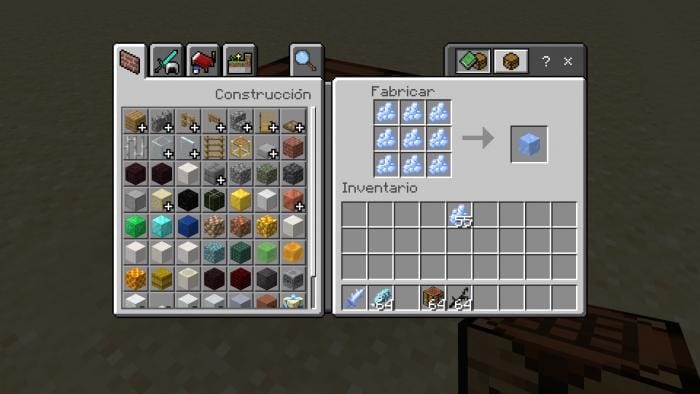
The basic recipe is simple. You need four Packed Ice blocks and a Crafting Table.
- Open your Crafting Table.
- Place four Packed Ice blocks in a 2x2 square.
- Collect the resulting four Packed Ice Bricks.
You don't need Blue Ice, regular Ice, or any additional materials.
This recipe gives you four bricks from four Packed Ice blocks, so there's no material loss when making the basic block.
If you're planning a large build, it's worth gathering plenty of Packed Ice before you start. Stairs, slabs, and walls all use the bricks as their main crafting material.
All Packed Ice Brick Variants
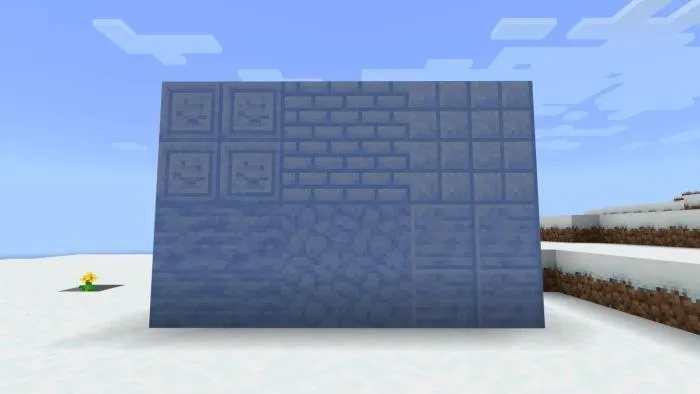
Packed Ice Bricks come with several additional shapes. These give you more freedom when working on roofs, entrances, pathways, and decorative walls.
Packed Ice Brick Slabs
Place three Packed Ice Bricks in a horizontal row on the Crafting Table to make six slabs.
Slabs work well for steps, low platforms, and floors where you don't want a full-height block.
Packed Ice Brick Stairs
Arrange six Packed Ice Bricks in the usual stair-shaped pattern to make four stairs.
They're useful for staircases, roofs, and curved-looking architectural details. You can also combine stairs with slabs to make a frozen building look less boxy.
Packed Ice Brick Walls
Arrange six Packed Ice Bricks across two horizontal rows to make six walls.
These are good for castle borders, walkways, and fences around an ice-themed village.
Chiseled Packed Ice
Chiseled Packed Ice is the decorative version of the block set. It has a different face texture that works well as an accent among ordinary bricks.
You can use the Stonecutter to make Chiseled Packed Ice rather than filling an entire wall with the more detailed texture.
For example, try placing it around windows, at the ends of pillars, or above a doorway.
How To Use The Stonecutter With Packed Ice Bricks
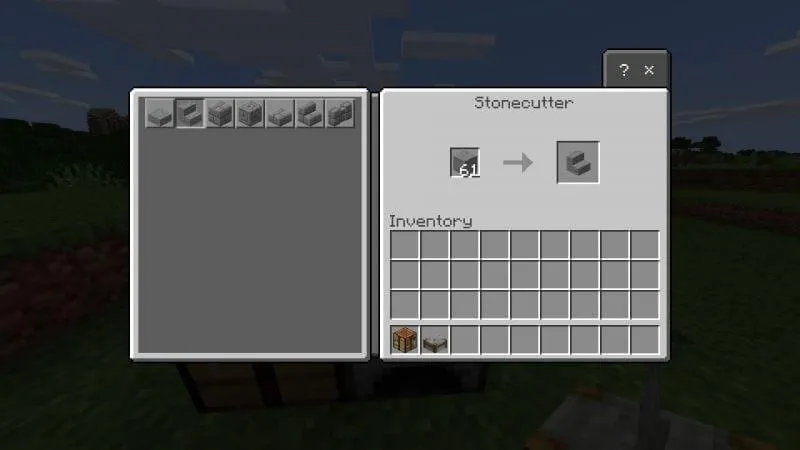
You don’t need a Crafting Table for every variant. A Stonecutter lets you turn Packed Ice Bricks into slabs, stairs, walls and Chiseled Packed Ice through a single menu.
To use it:
- Place a Stonecutter in your world.
- Open its interface.
- Put Packed Ice Bricks in the input slot.
- Select the variant you want.
- Collect the finished blocks.
The Stonecutter is especially useful for stairs. A Crafting Table uses six bricks to make four stairs, while a Stonecutter gives you one stair per brick. That saves materials when you’re building a large staircase or roof, and you can make the exact number you need rather than crafting batches of four.
Where To Find Packed Ice In Minecraft
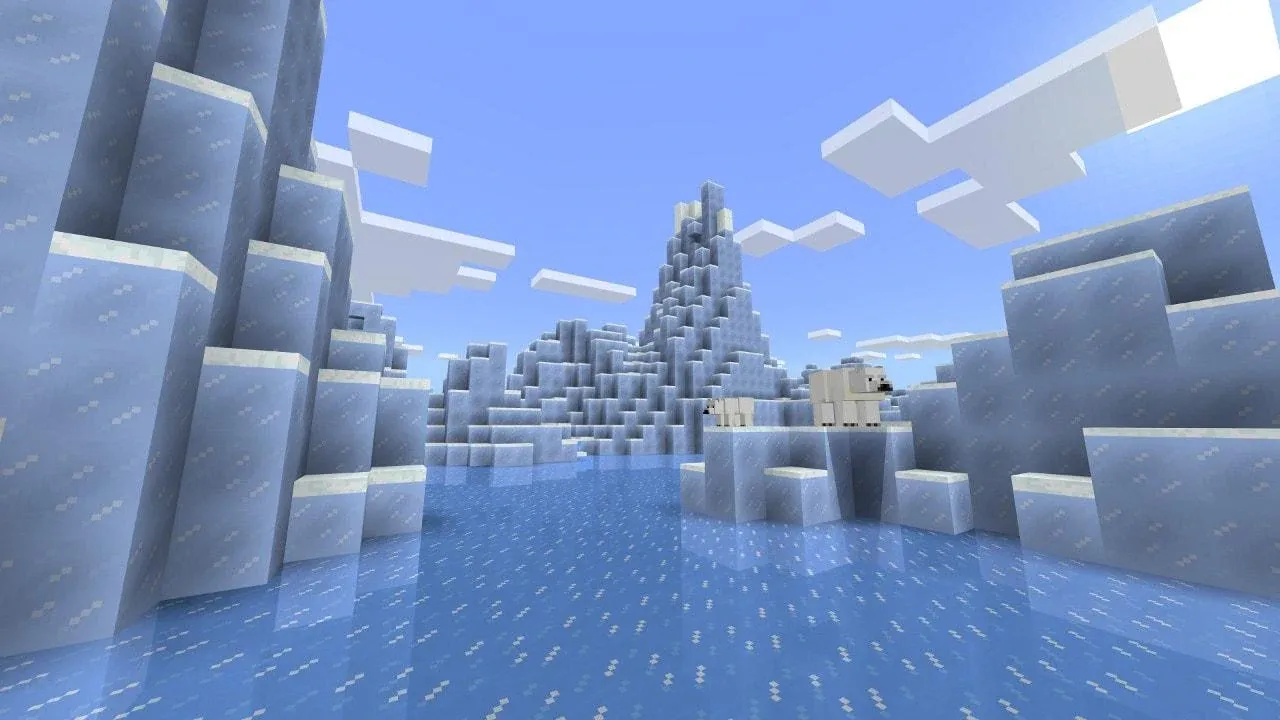
Ice Spikes biomes are a good place to gather Packed Ice, with tall formations made from the block. You’ll also find it in icebergs in frozen oceans. Bring a Silk Touch pickaxe when collecting it. Without Silk Touch, the blocks won’t drop when you break them.
If you’ve already collected plenty of regular Ice, you can craft Packed Ice instead. Fill a 3×3 crafting grid with nine Ice blocks to make one Packed Ice block. That’s useful for using up spare materials, but gathering Packed Ice directly usually saves time on larger builds.
The new Ice Caves contain Packed Ice too. They’re part of the upcoming game drop, so check your version before looking for them in an existing world.
Which Minecraft Versions Have Packed Ice Bricks?
Packed Ice Bricks first appeared in Minecraft Java Edition 26.4 Snapshot 5.
That snapshot introduced the basic brick block and its slab, stair, wall, and chiseled variants. Stonecutter support was included from the beginning.
Minecraft Java Edition 26.4 Snapshot 6 made another important adjustment: Packed Ice Brick variants now require a pickaxe to drop themselves when mined.
Bedrock players received the new block family in Preview and Beta 26.70.21. The following preview also included improvements to inventory placement, naming, and how the blocks interact with water and lava.
As of November 2, 2026, the new bricks are part of the testing content for Minecraft's fourth game drop of the year.
How To Try Packed Ice Bricks In Java Edition With Friends
If you want to try Packed Ice Bricks before their official release, you'll need to play on Minecraft Java Edition 26.4 Snapshot 5 or a newer snapshot that includes them.
To access snapshots, open the Minecraft Launcher, head to the Installations tab, and enable Snapshots. From there, create a new installation, select the appropriate snapshot version, and launch the game. You can then create a new world to experiment with the blocks.
If you want to test them with friends, you'll need a multiplayer server running the same snapshot. For self-hosting, this involves downloading the corresponding server .jar file from Minecraft's official snapshot announcement and running it on your own computer or dedicated machine.
Alternatively, if you're using a Minecraft hosting provider, you can install the snapshot through your server's control panel, depending on the features available. On a Minecraft server from Pine Hosting, for example, you can install Minecraft snapshots directly through the Versions tab without manually downloading or replacing server files.
If you've already tested the blocks in single-player, you can transfer your world to your Minecraft server instead of starting over. Once the server is running the matching snapshot version, you can continue building with friends.
Before switching versions, remember to back up your existing worlds, as snapshots are experimental and may introduce bugs. Everyone joining the server will also need to launch Minecraft using the same snapshot version.
Do Packed Ice Bricks Melt?
No. Mojang describes Packed Ice Bricks as decorative blocks that don't melt, making them useful for icy builds where nearby torches or other light sources might otherwise cause problems.
They also work well with the new Ice Cave materials, especially Ice Crystals and Icicles. For example, you could build an underground hall with Packed Ice Brick walls, add stairs at the entrance, and use Chiseled Packed Ice to decorate the doorway.
Can You Use Packed Ice Bricks On A Minecraft Server?
Yes, but your server needs to run a Minecraft version that includes them. Packed Ice Bricks are currently available in Java Edition 26.4 snapshots and Bedrock Preview builds, so they aren't available on regular stable servers yet.
For Java Edition, Mojang provides a downloadable server file for testing the snapshot with friends. Everyone needs a compatible game version to join, and it's best to back up your existing world before switching to a snapshot, since these test versions can contain bugs
Build Your Minecraft World With Pine Hosting
Packed Ice Bricks give Minecraft builders more options for frozen castles, winter towns, and ice-themed survival bases. With slabs, stairs, walls, and chiseled blocks, there's much more you can do than stack ordinary Packed Ice.
If you're planning a shared project, our Minecraft hosting gives you a place to build and play with friends without keeping your own computer running as a server.
Whether you're experimenting with new building materials or expanding an established survival world, you can explore our Minecraft server hosting options and choose a setup that suits your group.