

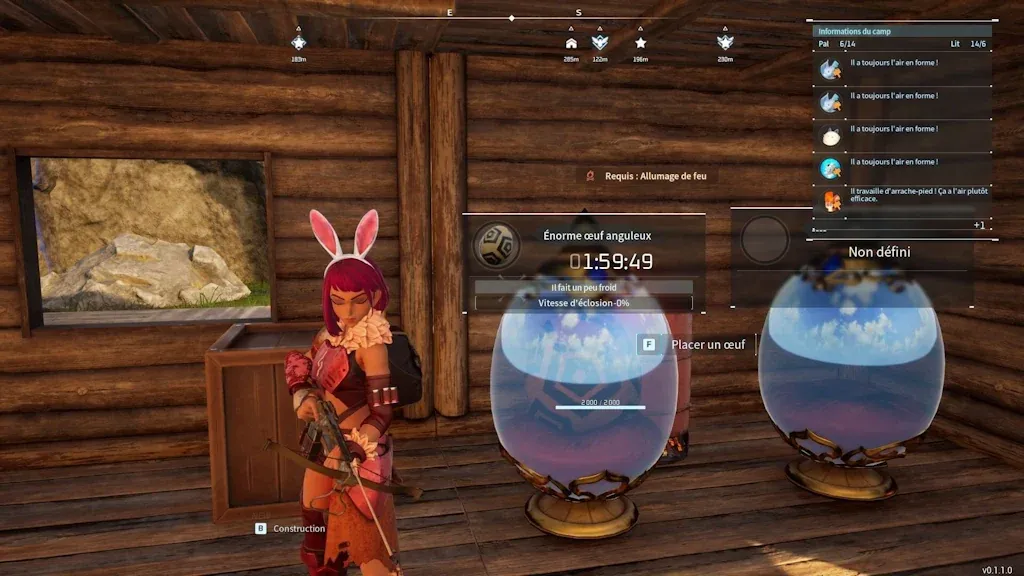
A Huge Egg can take longer to hatch than your whole evening of Palworld. That gets old quickly when you're breeding several Pals and trying to find a useful combination of traits.
On your own Palworld server, you can shorten the wait without changing how breeding works. The option is called PalEggDefaultHatchingTime, and you can edit it in the server settings. We'll cover the manual method, the faster way through our Pine Hosting panel, and what to do if an incubator still shows the old timer.

What Does PalEggDefaultHatchingTime Do?
Pocketpair's official server documentation defines PalEggDefaultHatchingTime as the time required to hatch a Huge Egg, in hours. It's not a speed multiplier: lower numbers mean shorter waiting times.
For a quick starting point, use these configured Huge Egg times:
0 = instant
0.5 = 30 minutes
1 = 1 hour
2 = 2 hours
12 = 12 hours
These are setting values, not guaranteed countdowns for every egg and incubator. If your group plays for an hour or two at a time, try 1 first. You can always change it again.
Palworld Egg Hatch Times By Setting Value
At neutral incubator temperature, a setting of 1 hatches a Huge egg in 1 hour, a Large egg in 30 minutes, and a Regular egg in 5 minutes. Use this table to pick a value before you edit your config.
| PalEggDefaultHatchingTime | Regular egg | Large egg | Huge egg |
|---|---|---|---|
| 72 (classic default) | 6 hours | 36 hours | 72 hours |
| 24 | 2 hours | 12 hours | 24 hours |
| 6 | 30 minutes | 3 hours | 6 hours |
| 2 (Hard preset) | 10 minutes | 1 hour | 2 hours |
| 1 (Normal preset) | 5 minutes | 30 minutes | 1 hour |
| 0.5 (Casual preset) | 2 min 30 sec | 15 minutes | 30 minutes |
| 0.1 | 30 seconds | 3 minutes | 6 minutes |
| 0 | Instant | Instant | Instant |
These times are calculated from the hatch formula: setting in hours x 3600, divided by the egg size divisor, divided by the incubator temperature rate.
Does Incubator Temperature Still Matter After I Change The Setting?
Yes. Temperature changes hatch speed on top of your setting. A Very Comfortable egg hatches 1.5 times faster, and an Optimal egg hatches 2 times faster.
How to Change Egg Hatching Time On A Dedicated Server
Save the world, stop the server completely and backup your Palworld world and settings before editing. Write down the current egg setting too, so you can undo the change without restoring the whole world.
If you run the server yourself, you'll edit its active PalWorldSettings.ini file. Tell everyone you're restarting, save the world, stop the server completely, and back up both the world and configuration before making changes.
On Windows, the path inside your PalServer installation is:
Pal/Saved/Config/WindowsServer/PalWorldSettings.ini
These folders are created after the server has run once. If there's no active settings file, copy DefaultPalWorldSettings.ini from the PalServer installation folder to the correct location and name the copy PalWorldSettings.ini. Editing the default template won't change the live configuration.
Open the active file and find PalEggDefaultHatchingTime inside the long OptionSettings=(...) entry. For a configured one-hour Huge Egg duration, use:
PalEggDefaultHatchingTime=1.0
Change only the number. Keep the surrounding commas, quotation marks and parentheses intact. Save the file, then restart the dedicated server.
How To Easily Change Egg Hatching Time With Pine Hosting
With our Palworld server hosting, you can edit the hatching time easily directly in the Server Config. Our video walkthrough will guide you through the process.
And the Palworld settings cover the same save and restart process for other changes.
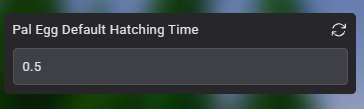
- Select your server in the game panel and click Stop. Wait until it’s offline.
- Open Server Config and search for egg. Find PalEggDefaultHatchingTime.
- Enter the number of hours you want and click Save.
- Return to Console, click Start, and wait for the server to come online.
What Egg Hatch Time Should You Use?
Most active breeding servers use a value of 1, which gives roughly a 1-hour wait for Huge eggs and less for everything smaller. Pick the value that matches how your group plays:
- Active breeding servers: 1. Players hunting for specific passive skills hatch many eggs, so short timers keep breeding fun.
- Casual servers with limited play time: 0.1 or lower, down to 0 for instant hatching.
- Servers that keep some vanilla pacing: 8 to 24 hours instead of the original 72.
Why Isn't My Palworld Egg Hatch Time Changing?
If your new hatch time doesn't apply, the usual causes are an egg that was already incubating, a server that wasn't fully stopped before editing, a Startup tab value taking priority, a broken config line, or a WorldOptions.sav file overriding your settings.
- An egg was already incubating: Pick it up and place it back in the incubator. Eggs placed before the change may keep their old timer.
- Server wasn't fully stopped: Stop the server before editing, because changes made while it runs are overwritten. Then start it again, since settings are only read at startup.
- The Startup tab overrides your value: Settings in the Startup tab take priority over the Server Config tab and PalWorldSettings.ini. Check there first.
- The config line is broken: A missing comma, bracket, or quotation mark can stop PalWorldSettings.ini from loading. Compare your line against a backup.
- Open the File Manager and go to
Pal/Saved/SaveGame/0/<ID of your server>. If a file calledWorldOptions.savexists there, back it up and delete it. It overrides your panel settings and stops changes from applying.
If your settings still aren't applying, check whether startup values are overriding your changes.
This can also happen with transferred saves, especially when moving from co-op to a dedicated server.
Don't Wait And Hatch Eggs Faster With Pine Hosting
A shorter timer can give your group time to hatch an egg and try out the new Pal before the evening’s over. Pick a wait time that fits how you play, then give it a session before changing it again.
If you’re starting a world with friends, choose our Palworld server hosting and set the incubation time together. You can adjust it from the game panel as your group gets further into breeding.