

Rust server tags help players understand what kind of experience a server offers before they join.
Some options are only browser labels, while others are connected to ConVars that change gameplay. A hosting panel may also combine a tag with several settings as a preset, making it look like the tag itself caused the changes.
Rust Server Tags And ConVars Are Different
Manual tags are added through the server.tags ConVar:
server.tags weekly,vanilla,roleplay
Rust displays up to four tags beside a server. Tags from the same group should not be combined. Do not use weekly and monthly together, or Softcore and Hardcore together, because this can interfere with browser filters.
The key distinction is that server.tags describes the server. It does not normally configure it. Some gameplay ConVars automatically add a matching classification, but manually adding the word does not activate the feature.
Wipe Schedule Tags
The wipe tags are weekly, biweekly, and monthly. They tell players how often the map normally wipes, but they do not schedule a wipe or reset blueprints.
Vanilla, Softcore, And Hardcore
Vanilla represents normal Rust gameplay. For a standard server, leave server.gamemode empty and use the vanilla tag to describe the experience.
Softcore is activated with:
server.gamemode softcore
Softcore provides 2x resource gathering and limits normal base raiding to a default window between 6 PM and 9 PM using the server's local time.
Outside that window, Tool Cupboards protect nearby building blocks and doors. Deployables can still be damaged, and a Tool Cupboard must be at least one hour old before its protection applies.
Softcore also reduces player bullet damage by 25 percent, lets players retain 50 percent of eligible inventory after many deaths, creates repairable debris for several destroyed deployables, preserves Tool Cupboard authorization for 48 hours, and gives a destroyed sleeping bag one final respawn.
Hardcore is activated with:
server.gamemode hardcore
Hardcore still allows players to open the map, but unexplored areas are covered by fog of war. The player location is hidden unless a compass is equipped in the belt, and the normal compass display is removed.
It also prevents firearms from being crafted or researched, increases ammunition crafting costs, lengthens respawn cooldowns, doubles upkeep, and disables clans.
PvE Mode
The built-in PvE setting is enabled with:
server.pve true
This prevents normal player damage and can reflect attempted damage back onto the attacker.
The system is basic and can behave unexpectedly with NPCs, events, traps, or plugins. Most polished PvE Rust servers use a dedicated plugin so the owner can separately control damage between players, NPCs, animals, buildings, vehicles, and events.
Creative And Build Servers
The creative and builds tags do not automatically give players creative powers.
To apply Creative Mode to everyone, use:
creative.allusers true
creative.freebuild true removes building costs. creative.freeplacement true bypasses placement checks. creative.freerepair true removes the repair delay. creative.unlimitedio true expands electrical limits.
Creative Mode does not automatically give every player noclip. Noclip normally remains an administrator feature unless permissions or plugins provide it.
The builds tag is intended for base design and building practice. These servers often combine Creative Mode with plugins for saving builds, spawning items, removing structures, and controlling damage.
Roleplay, Minigame, Training, Battlefield, And Battle Royale
These Rust server tags describe an experience created by the server owner. They do not have matching stock Rust configurations that build the server automatically.
roleplay is used for roleplay maps with custom towns, economies, special rules, or restricted combat.
minigame is used for arenas, short rounds, custom objectives, or rotating activities.
training is intended for aim practice, recoil practice, and more, that come with selectable loadouts.
battlefield normally describes fast combat servers with kits, all-for-all matches, increased resources, rapid respawns, and less survival progression.
broyale is for Battle Royale servers using custom maps or plugins to create rounds, loot systems, zones, and last player standing rules.
Primitive Mode And Eras
Primitive mode is enabled with:
server.gamemode primitive
It restricts advanced weapons, armor, explosives, building grades, monuments, scientists, helicopters, Cargo Ship, Bradley APC, and other modern content. It also reduces sulfur node spawns and increases the technology tree tax.
The server.era setting controls the technology level. primitive applies the strictest restrictions. medieval allows a small selection of early firearms while keeping most advanced technology restricted. frontier currently behaves similarly to Medieval. rust and none remove era restrictions and return normal progression.
Tutorial, Premium, Modded, And Region Tags
Tutorial Island is enabled with server.tutorialEnabled true, while tut advertises compatibility in the browser.
Rust premium servers are enabled with server.premium 1. This adds the Premium tag and restricts joining based on Premium Access requirements.
Modded, Oxide, and Carbon communicate modification status. Region tags such as NA, EU, SA, WA, EA, OC, and AF help players find a nearby server.
Make Your Rust Server Easier To Find And Manage
Accurate Rust server tags should match the experience your server actually provides. Your server name and description should also clearly include details such as the wipe schedule, region, gather rate, team limit, and main game style so players can quickly decide whether the server is right for them.
With the Pine Hosting panel, you do not need to search through ConVars, edit startup commands, or work out which files control each setting. All available server tags, game modes, and related options can be managed through a clear interface with simple descriptions and selectable controls.
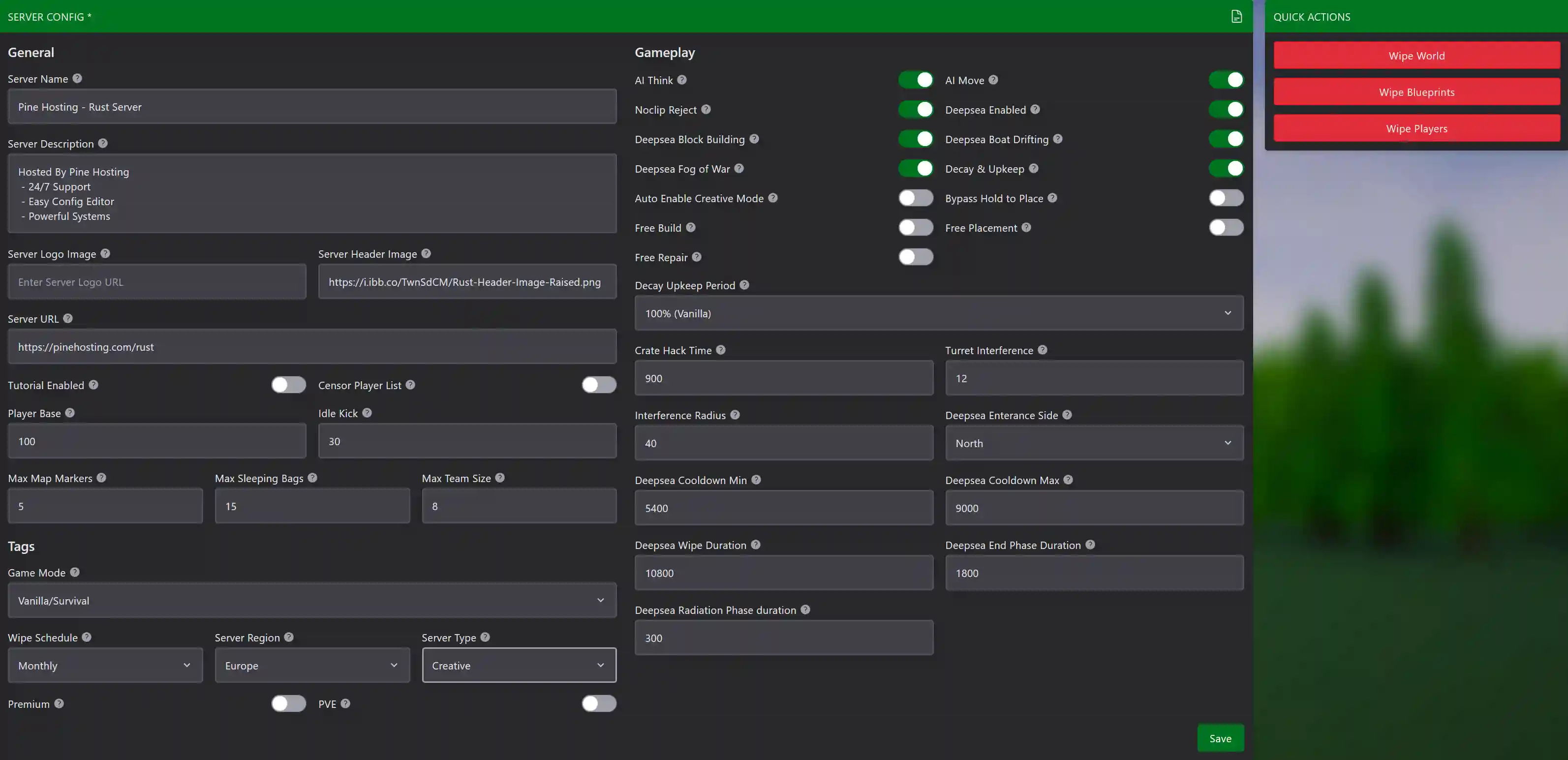
Each game category also displays additional settings that apply to it. For example, Creative servers can enable options such as free building, free placement, and free repairs. Primitive servers can select their preferred era and adjust the available level of technology. You can basically change anything from your server's name and description, down to specific settings about the Deep Sea wipe and behaviour.
This makes it easier to configure your Rust server correctly, keep its browser tags accurate, and make changes without searching through configuration files or documentation.
Manage Your Rust Server With Pine Hosting
Pine Hosting makes Rust server settings easier to manage through a straightforward game panel. You can configure ConVars, manage files, install plugins, create backups, use the console, and restart your server without maintaining hardware at home.
Whether you are creating a Vanilla, Softcore, Hardcore, Primitive, PvE, Creative, or modded server, Pine Hosting provides dedicated Rust server hosting with the tools and support needed to manage it.
For anyone comparing Rust hosting providers and looking for the best Rust hosting experience, Pine Hosting makes it easier to configure your server correctly and help the right players find it.
