

Hytale Update 5 is one of the most important updates so far for creators, community hosts, and players who want more ways to explore the game. This Hytale server update adds new tools for building interactive worlds, better ways to discover community servers, early controller support, new social features, creative mode improvements, audio upgrades, performance changes, and several follow-up hotfixes that clean up important issues.
For anyone planning to run a Hytale server, this update is especially interesting because it does not only focus on gameplay polish. It also improves the tools that make custom worlds, minigames, adventure maps, and modded experiences easier to build and manage.
Trigger Volume Tool Adds No-Code Interactive Events
The biggest creative addition in Update 5 is the Trigger Volume Tool. This tool allows creators to place invisible 3D areas in the world that can trigger effects when certain conditions are met. For example, a trigger volume can react when a player enters an area, leaves an area, breaks a block, or interacts with a specific space.
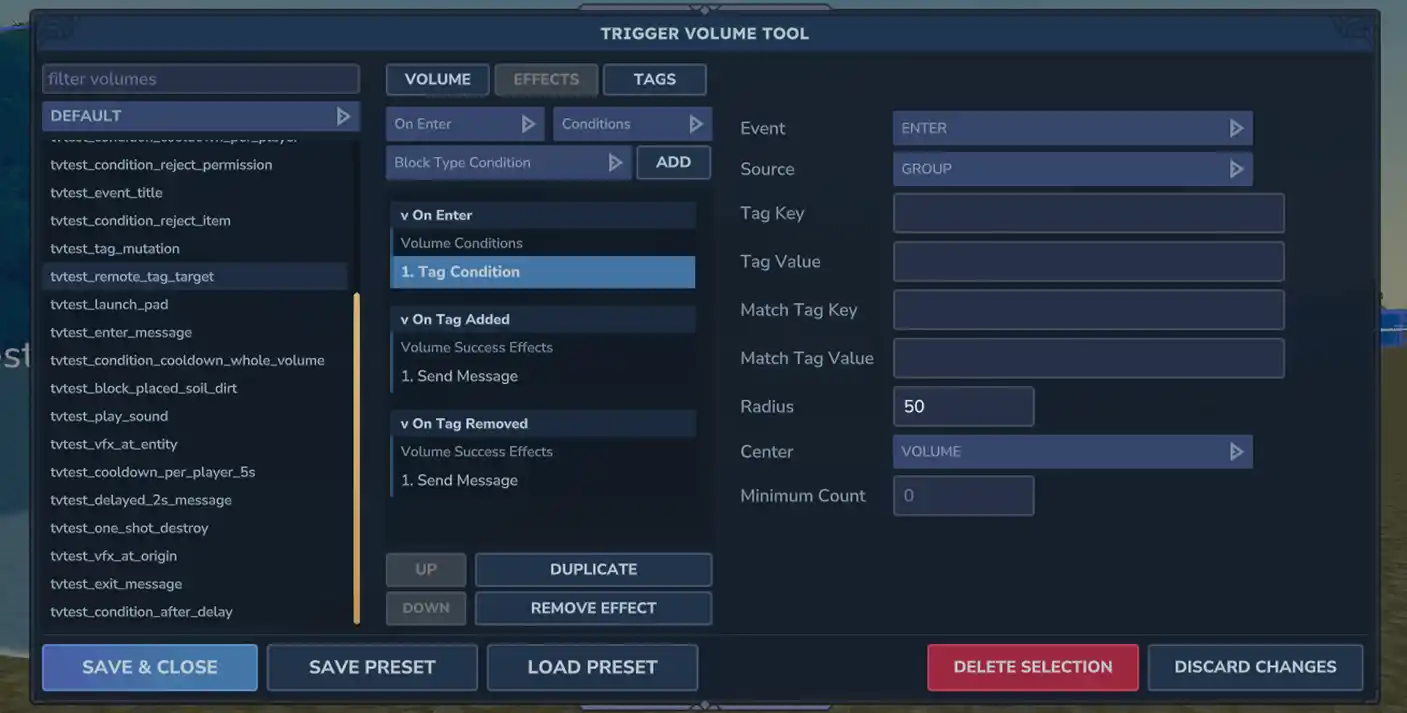
Creators can use these volumes to play sounds, spawn NPCs, trigger visual effects, change the weather, teleport players, adjust inventory, place prefabs, or change game modes. Volumes can also use delays and conditions, which means creators can build more advanced sequences without needing to write code.
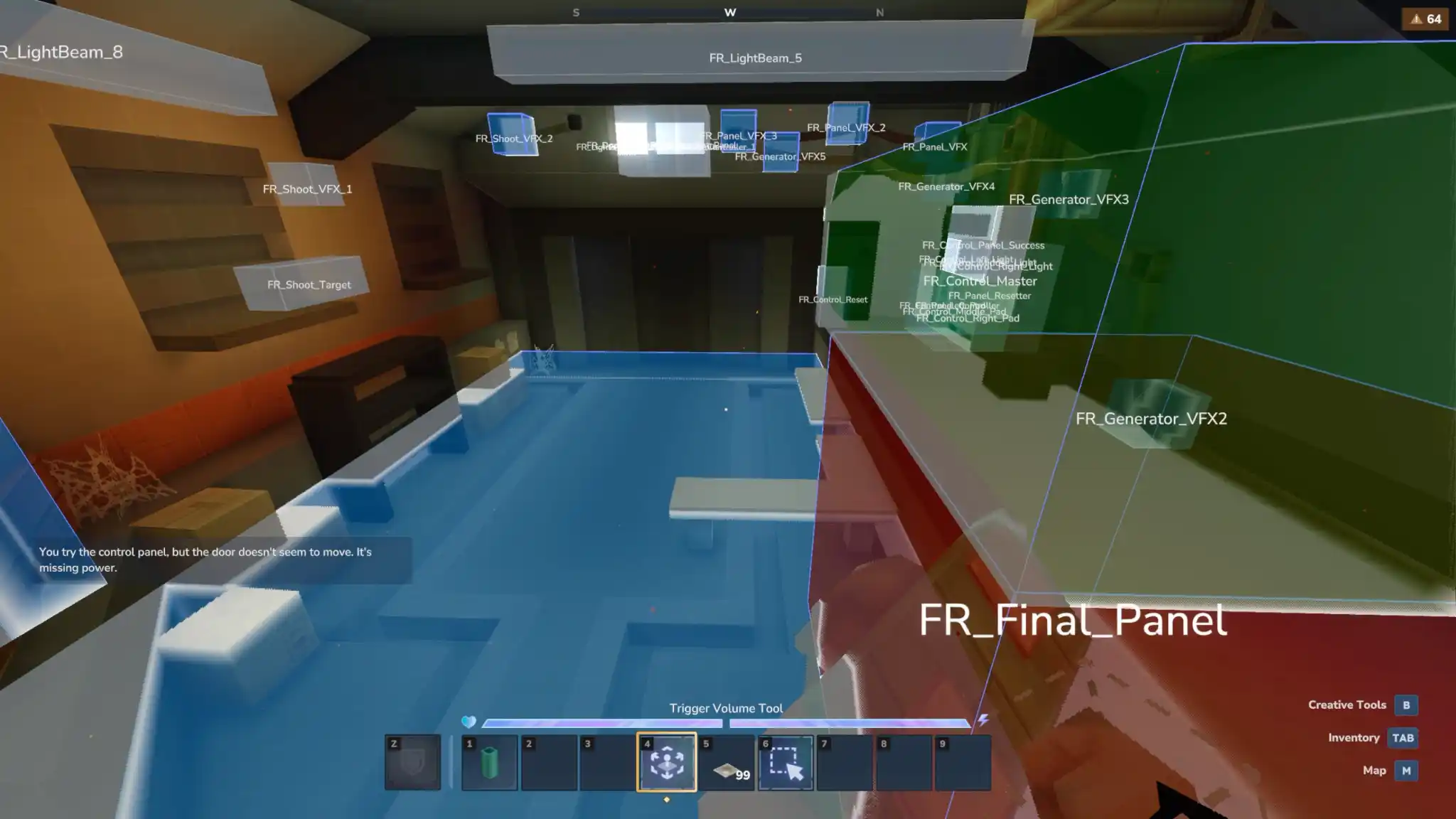
This is a huge upgrade for anyone making custom content on a Hytale server. Server owners can create puzzle rooms, boss arenas, ambushes, safe zones, tutorials, story moments, hidden areas, and event-based gameplay directly in-game. Since trigger volumes can also be saved inside prefabs, entire interactive builds can be reused across worlds or shared as part of larger projects.
Server Discovery Makes Community Servers Easier To Find
Update 5 also introduces Server Discovery, a major step forward for public Hytale server communities. Server owners can submit their servers for review, and approved servers can appear inside the in-game discovery page. Players can search for servers by title or description, use tags to filter results, see likes and favorites, and return to servers they have recently played.
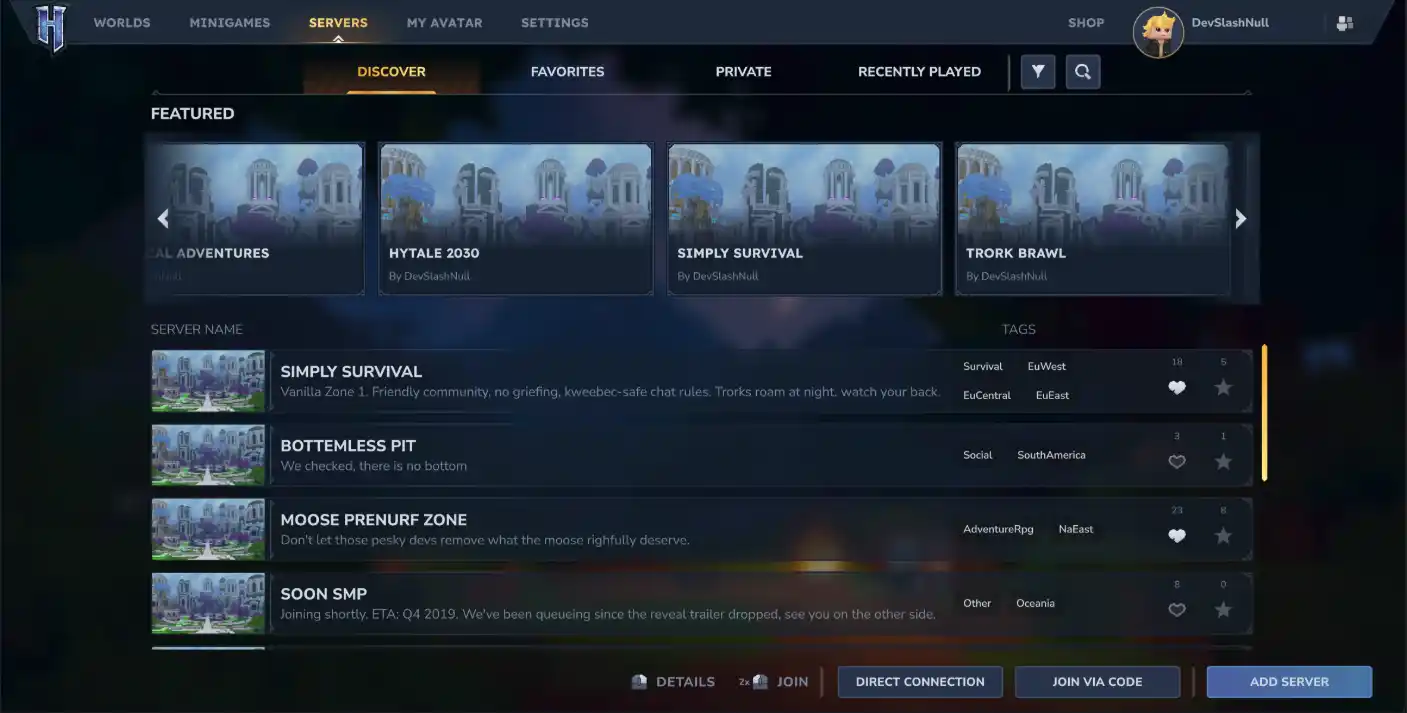
For server owners, this makes visibility much easier than relying only on Discord posts, websites, or word of mouth. A well-made Hytale server with a clear identity, good description, and polished gameplay loop now has a better chance of being found directly by players browsing in-game.
This also makes Hytale server hosting more important. If players are discovering servers from inside the game, performance, uptime, world stability, and a smooth first impression matter even more. A server that loads quickly, runs reliably, and has a clear gameplay experience will stand out much better.
Controller Support Arrives In Its First Version
Controller support has also arrived in its first form. Players can now use Xbox, PlayStation, and Nintendo Switch controllers for movement, combat, exploration, and menu navigation. The update also adds adjustable movement-stick dead zones from 5% to 95%, which helps players tune controls to their preference.
This is not the final controller experience yet, but it is an important foundation. Some advanced interactions may still be easier with keyboard and mouse, especially for detailed creative tools, but the update makes Hytale more comfortable for players who prefer gamepads.
For multiplayer communities, this is a quiet but meaningful accessibility improvement. A Hytale server can now appeal to more types of players, especially casual players who want to explore, build, or adventure from a controller-friendly setup.
Social Sidebar Improves Friends And Invites
The new Social Sidebar adds a friends list, online status, friend invites, world joining, favorites, blocking, and Discord friend integration. Players can receive in-game toast notifications when they get friend requests or world invites, and social settings can be adjusted for incoming requests.
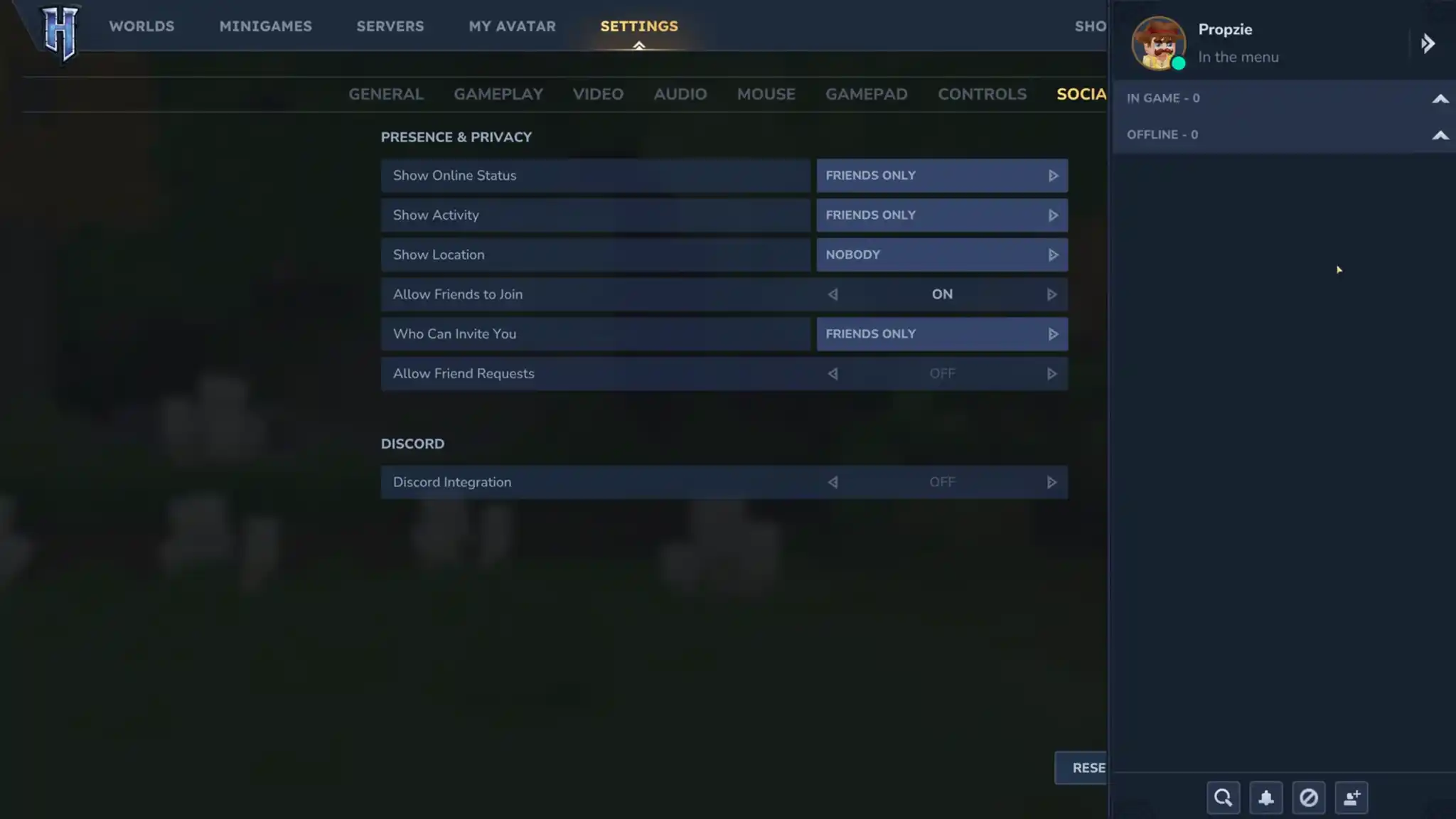
This helps reduce friction for multiplayer sessions. Instead of relying entirely on external messages or manual connection steps, players can join friends more easily from the main menu. For community servers, this should make it easier for groups to bring friends into the same world and keep returning together.
Creative Mode Gets Better Building Tools
Creative Mode receives a large set of placement improvements. New placement settings include Replace, Type Replace, Extrude, Draw, Fast Place, Eraser, Free Place, No Physics, and Highlight Block Target. These options give builders more control over how blocks are placed, replaced, erased, and previewed.
The Extrude and Flood tools have also been combined into a reworked Extrude Tool, while prefab previews now include an interactive 3D view. Creators can rotate, zoom, tilt, and pan prefabs before placing them, which should make large builds easier to manage.
The Sculpt Brush Tool has also been improved, combining smoothing behavior into one tool and adding new modes, sampling options, erosion strength, fluid handling, mask presets, and performance improvements. For builders creating large maps or custom terrain for a Hytale server, these changes make the creative workflow faster and less frustrating.
Modding, Commands, And Permissions See Major Improvements
Update 5 also improves commands and permissions. Chat commands now support tab autocomplete and suggestions, making server management and creative work easier. Permissions are no longer tied directly to gamemode, allowing server owners to assign roles based on what players should be allowed to do instead of relying only on operator access.
New commands include /locate, which can find or teleport to specific biomes, zones, regions, and prefabs, plus new /kit commands for adamantite, iron, and debug loadouts. These changes are useful for testing, moderation, and world navigation.
Modders also get several technical additions, including item name and description overrides, projectile creator UUID access, WorldGen V2 setup tools, Node Editor support for macOS and Linux, falling block impact support, explosion configuration improvements, and more world-generation hooks.
Audio, Music, And World Polish Make The Game Feel Better
Update 5 adds more than an hour of new music across Emerald Wilds, Howling Sands, and Whisperfrost Frontiers. Audio occlusion and diffraction have also been introduced, meaning sound can now react more naturally to walls, materials, corners, and doorways.
There are also improvements to reverb, ambience detection, music layering, and first-person versus third-person sound positioning. These changes may sound small individually, but together they make exploration and multiplayer spaces feel more alive.
World and block changes include better world-gen thread allocation for server stability, more Goldenwood in Zone 4, improved crop growth checks, better block breaking effects, rope block improvements, more craftable grass blocks, and a long list of rendering and collision fixes.
Hotfixes Clean Up Important Issues After Update 5
Several hotfixes followed Update 5, and they are worth mentioning because they fix real gameplay and server problems. Version 0.5.1 fixed a server boot issue caused by malformed server version data. Version 0.5.2 fixed social bar flickering, ambience volume settings, empty block filters, scripted brush issues, server discovery protocol handling, and spawning problems in worlds with void sections.
Version 0.5.3 improved movement by preserving sprinting during crouch-sliding, fixing sprint input resets, and making rolling on landing reduce fall damage properly. It also fixed a memory leak after leaving a world, a rare block lighting race condition, long server description scrolling, friends list scrolling, mod compatibility warnings, and WorldStructure asset reloading.
Version 0.5.4 fixed renamed cosmetics causing connection errors, chests disappearing when placed beside an open chest, tamed NPCs despawning around similar creatures, voice chat crashes, fluid placement crashes, armor stat recalculation performance, fullscreen toggle problems, and trigger volumes spawning correctly in WorldGen V2 prefabs.
Why This Update Matters For Hytale Server Hosting
Update 5 is not just a content patch. It is a foundation update for multiplayer creativity. Server Discovery gives public communities a better path to reach players. Trigger volumes give builders no-code tools for interactive events. Permission changes make server management cleaner. Creative tools make worldbuilding faster. Hotfixes improve stability where it matters.
If you are planning a modded Hytale server, this is the kind of update that opens the door to more custom experiences. Adventure maps, roleplay servers, minigame hubs, survival communities, and creator-led worlds all benefit from better tools and better visibility.
Try The New Update With Pine Hosting
Want to check out the new Hytale server update with friends or start building your own community? Pine Hosting makes it easier to launch and manage a Hytale server without worrying about local setup, uptime, or hardware limits.
With dedicated Hytale server hosting from Pine Hosting, you can focus on testing the new tools, building custom worlds, inviting players, and exploring what Update 5 has added. Whether you want a private world for friends or Hytale server hosting for a larger community, Pine Hosting gives you the performance and control needed to enjoy the update properly.
